
Account Assessment for New Relic
Assemble every recommendation and finding X-RAMP has for one account into a single report for its owner.
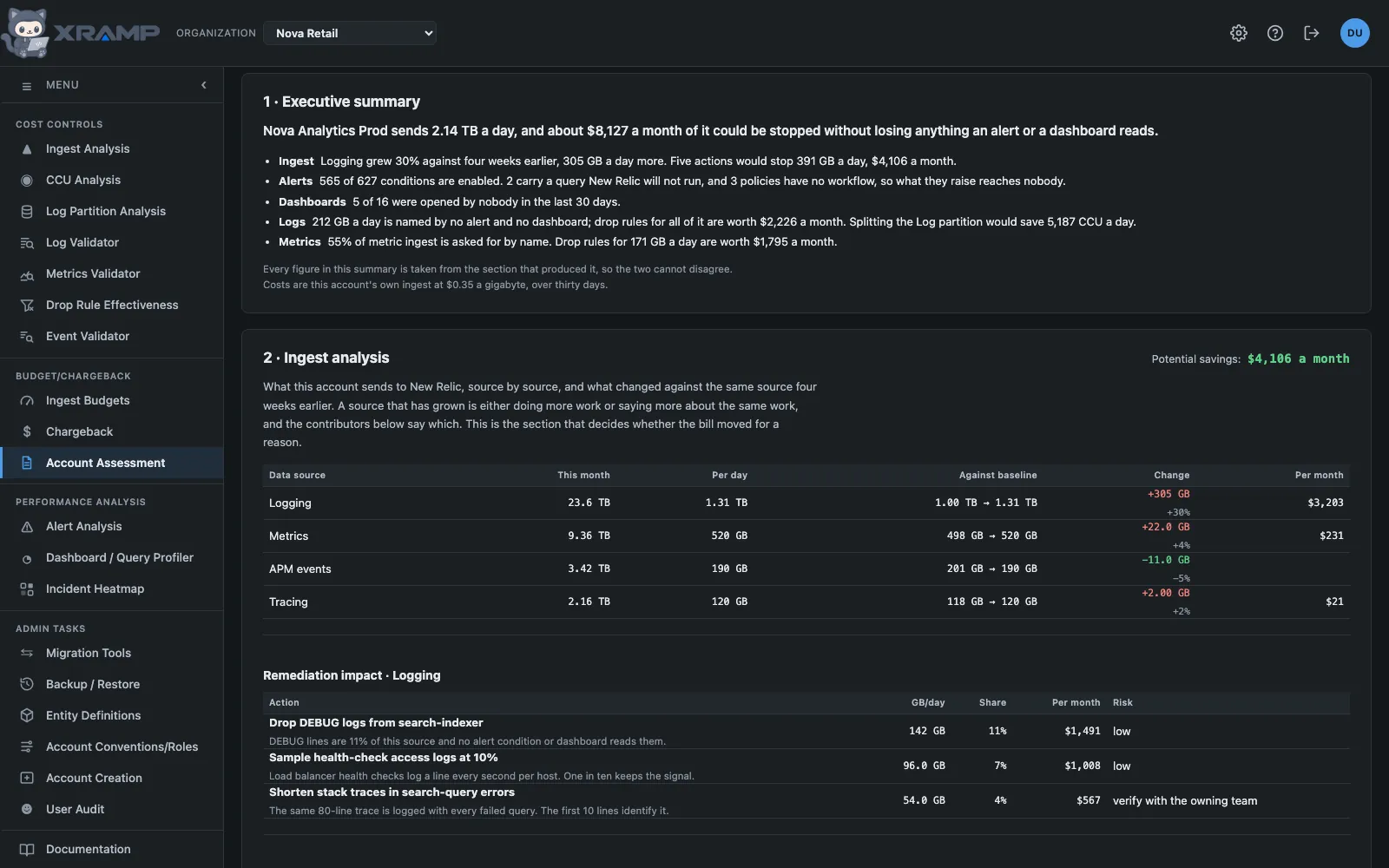
What it shows and how to read it
One report for one account, assembled from every analysis this application knows how to do, written to be printed and sent to the person who pays for the account.
What it contains
The account's name and id, the date it was produced, and the budget owner, GBL and cost center from the Chargeback table.
An executive summary computed from the sections below it rather than written beside them, so the two cannot disagree. Where a section could not be measured, the summary says the number is unknown rather than counting a failure as a zero.
Ingest analysis for every data source in the account, against the same source four weeks earlier, and the remediation the variance screen would propose for each one, built from the same code so the two cannot drift apart.
Alert analysis: the full audit of every policy and condition, and beside it the incidents the account actually raised in the last 24 hours. What could fire and what did, in one place.
Dashboard analysis: how many dashboards were opened by nobody in the last 30 days, and a recommendation to review them. The dashboards themselves are on the profiler, which can sort and search them; a report is read once and the count is the finding.
Log analysis: how the account's logs are partitioned, with the candidate splits and what each would save, followed by the log validator's findings, its partitions and the drop rules for streams nothing mentions.
Metric analysis: the metric validator's findings and the drop rules for metrics nothing asks for.
What each section is worth
A section heading carries the saving acting on it would produce, out at the right margin. A section with no saving to offer leaves it off rather than printing zero: the alert audit is not about money, and a heading reading "Potential savings: $0" would say it had looked and found nothing.
Only what can actually be stopped is priced. That is not the same as everything nothing reads, and on some accounts it is nowhere near: a log partition queries read without ever naming a stream in it is left out of the drop rules, because nothing in it can be called unused. RTL Prod - US has 2.66 TB a day in one such partition against 5 GB the rules cover, so the report says $37 a month rather than $19,165. The wider figure is still stated beside it, as context rather than as a saving.
The partition savings are quoted in CCU rather than dollars, because a split changes what queries scan and not what is stored: the same logs are kept either way.
Producing one
Produce report runs every analysis in turn against that account. It is thousands of calls to New Relic on the shared key and takes minutes on a large account, so it asks first and says what it is about to do.
It reuses anything measured in the last day, which is what makes a second report quick, and Re-measure ignores all of that and runs everything again.
Running it is an admin's; reading a stored report needs only the module.
A section that fails is marked where its findings would be and the rest of the report still arrives. That is deliberate: a section quietly missing reads as "this account has no logs" rather than "nobody measured", and a report somebody forwards is the worst place for that distinction to go missing.
Print gives the document to send. The controls, the account picker and the status line are not part of it.
Related modules
Every X-RAMP plan includes every module. See the plans.