
Alert Analysis for New Relic
Audit an account's alert policies and conditions in full: what can fire, what is silenced, what is broken, and what is not needed.
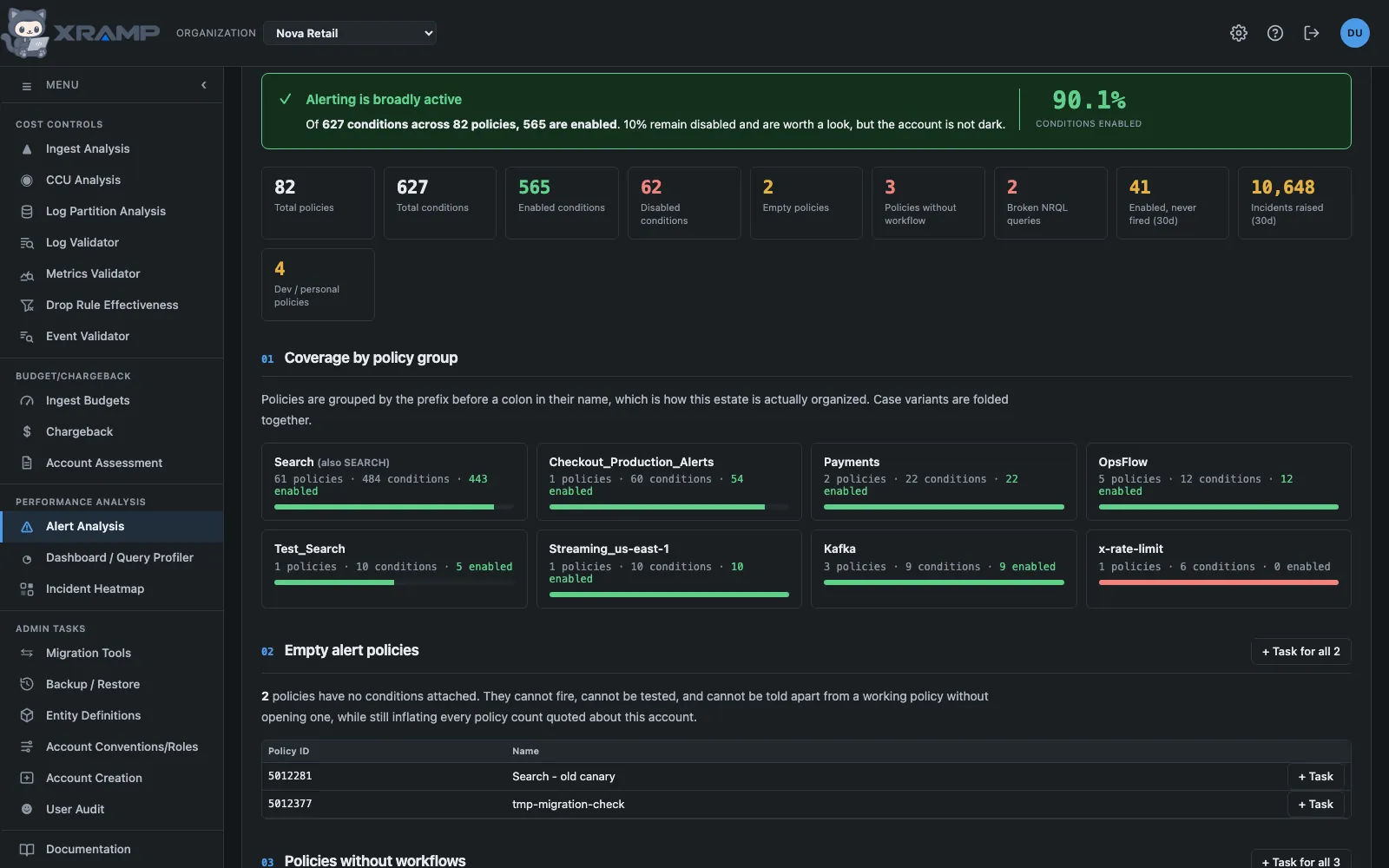
What it shows and how to read it
Pick any account and run a complete audit. Every policy and every NRQL condition is read to completion, with no sampling.
What the headline means
The percentage at the top is how many conditions can actually fire. Below 25 percent the report opens by saying the estate is effectively dark, because a policy that exists but is switched off produces no notification at all.
Sections
- Coverage by policy group. Policies grouped by the prefix before a colon in their name, which is how these estates are organized in practice.
- Empty policies. No conditions attached, so they cannot fire and cannot be told apart from working ones without opening them. Every kind of condition counts: a policy holding only infrastructure, APM, synthetics or external service conditions is not empty, and a policy that could not be read in full is never called empty.
- Older condition types. Infrastructure, APM, synthetics and external service conditions are not NRQL conditions, and New Relic lists them separately. They are read too and counted in every figure here; this section shows which policies hold them. Validating the query and the signal check apply to NRQL conditions only, since the older kinds have no query.
- Policies without workflows. A workflow is what carries an incident to a destination. Without one, anything raised reaches nobody.
- Conditions with bad NRQL. Queries that do not execute.
- Disabled conditions, grouped by policy.
- Conditions never fired. Enabled but silent. Silence can be correct for a rare failure, but a threshold that can never be met looks exactly the same.
- Noisy conditions. High volume alerting that trains people to close without reading.
- Development and test policies, incident preference, and recommendations generated from what the audit found.
Validating NRQL
The checkbox runs every condition query against the account to prove it parses. That is one query per condition, which is fine for a few hundred and slow for several thousand, so it is a choice rather than an assumption.
Creating tasks
Every row in sections 2 through 10 has a button that turns it into a task. Each section header has one that creates a single task covering every item in that section. Where a table is capped for display, the section task still covers the full set.
Results are cached for 7 days per account, and Run analysis opens that copy when there is one, which is why a large estate can appear at once. Re-run ignores the stored audit and queries New Relic now, which is the slow path and the one to use when the estate has changed. Admin can also have the cache filled for chosen accounts on a schedule, under Alerts analysis config.
Related modules
Every X-RAMP plan includes every module. See the plans.