
Dashboard / Query Profiler for New Relic
Browse an account's dashboards, see which are used, and identify the queries that cost the most compute.
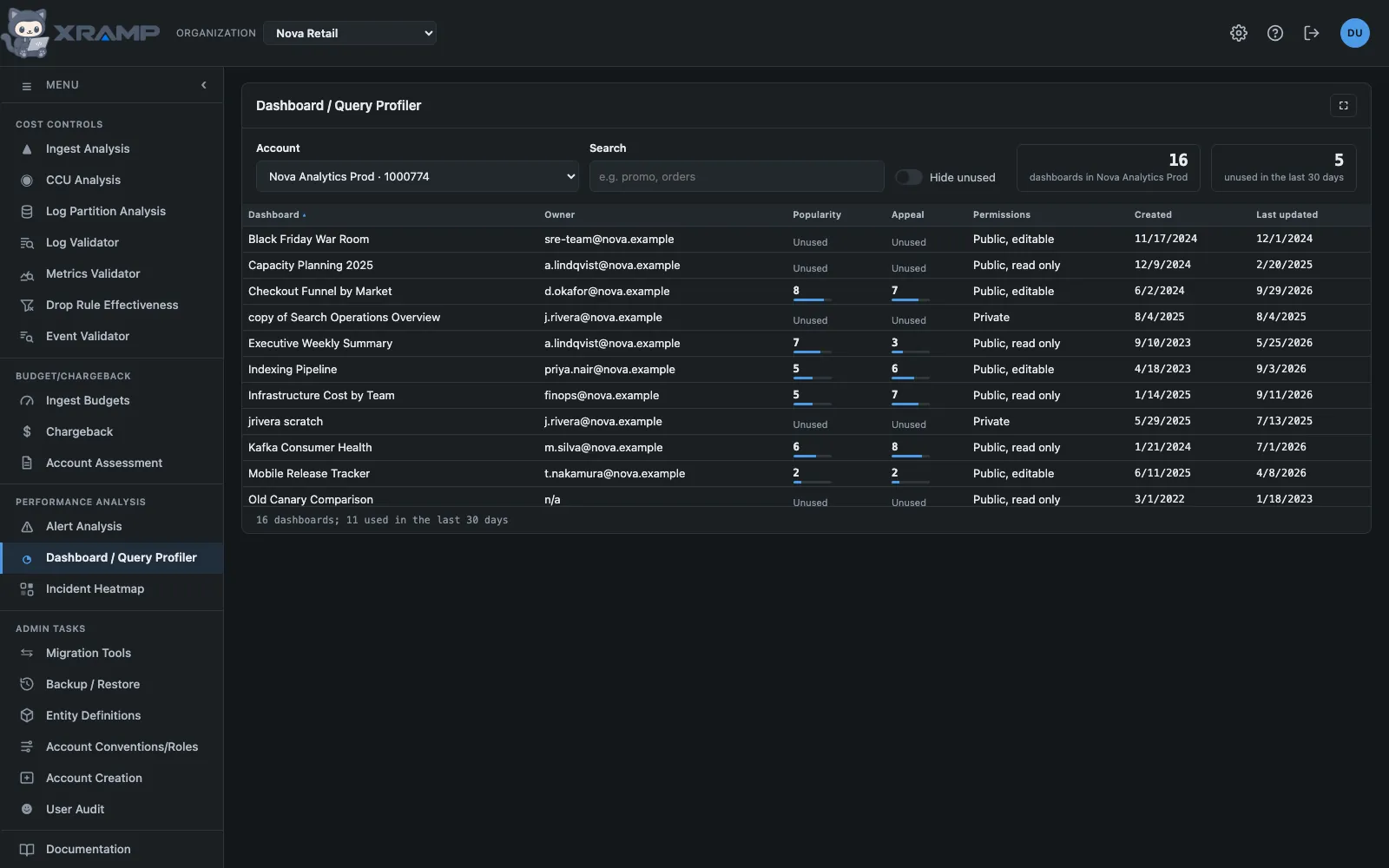
What it shows and how to read it
Pick an account to list its dashboards, then click one to see the queries behind its widgets, what they cost over the last day, and to run them. The CCU and time levels that color everything here are set in Admin, under CCU variance thresholds, and can be overridden per account.
The dashboard list
Ten rows at a time, every dashboard in the account, pages excluded. Search matches a dashboard's name or its owner, and several terms separated by commas show dashboards matching any of them. Dashboard, Owner, Popularity and Appeal each sort; the score columns start with the highest. Click any row to open its detail.
Two cards at the right of that row count the account's dashboards and how many nobody has run in the last 30 days. In Aurora Retail Prod that is 1,373 dashboards, of which about four in five are unused.
Popularity and appeal
Both come from the last 30 days of who actually ran each dashboard, and both count people rather than runs. A dashboard left open on a wall screen refreshes all day, so its run count says little about how many people rely on it.
Popularity is how many different people used a dashboard, from 1 to 10. It is on a log scale against the account's most used dashboard, because use is lopsided: most dashboards have one or two users and a few have dozens. A dashboard needs at least 10 users to score 10.
Appeal is whether people come back, from 1 to 10, however many there are. Half comes from the share of its users who used it on two or more separate days, and half from how many days its typical user used it, with full marks at eight days of 30. A dashboard one person keeps open every day can have high appeal and low popularity; read the two together.
A dashboard nobody ran in 30 days shows Unused. The Hide unused switch beside the search box leaves them out of the list; it is remembered, and it waits until usage has been scored. Scores are worked out once a day per account; the first visit of the day can take a little while and spends a few CCU. Hover a score for the numbers behind it.
Dashboard Detail
Cards across the top in three groups: the dashboard itself, its queries, pages and how many you have run here; the last 30 days, with its users and both scores; and the last 24 hours, with the runs New Relic recorded, what they cost in CCU and their average response time. Below them, one row per widget query, with the query text, what it cost over the last day, the result of running it here, and the button to run it.
New Relic, beside the heading, opens the dashboard itself in New Relic in a new tab.
Recorded, last 24h comes from New Relic's own records of the dashboard being used, matched to a widget by the text of its query. A run that a filter or a variable rewrote is recorded under different text and cannot be tied back to its widget, so a busy dashboard often shows a match for only some of its queries; the cards say how much of the day's cost the matched ones cover.
Run executes one query once, now, as written and over its own time window. It spends CCU, and can cost more or less than the dashboard's own runs. Its time and CCU are each marked OK, Warning or Critical against the account's levels, and the run's CCU multiplied by the dashboard's recorded runs gives an estimated cost per day, judged the same way. The row's left edge takes the worst of the three, and the table keeps its place while a query runs.
Narrowing the list, and running everything unmatched
Above the queries, the CCU and Execute filters narrow the list to queries at warning or critical level. A query takes the worst level among its figures, recorded and run now, so a critical query is not also counted as a warning. Choosing several filters shows queries matching any of them, and the filters stay set when you open another dashboard.
Run all, at the right of the filters, runs every query with no matching recorded run that can run as set, two at a time, after asking. Queries already run are skipped, and Stop starts no more while letting the runs in flight finish. Each run spends CCU.
Dashboard variables
Under a query that uses dashboard variables, each variable has a control that starts at the dashboard's default: a pull-down for a fixed list, a text box for a typed value, and for a list the dashboard fills from a query, a Load values button that runs that query once (it spends CCU) and fills the pull-down. Choose other values and Run uses them; Use defaults puts them back. Values are quoted and checked before they reach the query, and a fixed list accepts only its own choices. Recorded runs are matched only at the defaults, marked "at variable defaults". A multi-select variable set to every value cannot be expanded here, so choose the values to run it with.
A dashboard can narrow one list by another, listing markets only for the namespace chosen above them. Loading such a list uses what is chosen on that row, and where nothing is chosen, every value of the variable it depends on, which is what the dashboard itself does with "select all". Choosing a different value for the variable it depends on clears the narrowed list so it loads again.
Related modules
Every X-RAMP plan includes every module. See the plans.