
Incident Heatmap for New Relic
See incidents hour by hour over 24 hours to 7 days, across the estate, for one account, or for one condition.
What it shows and how to read it
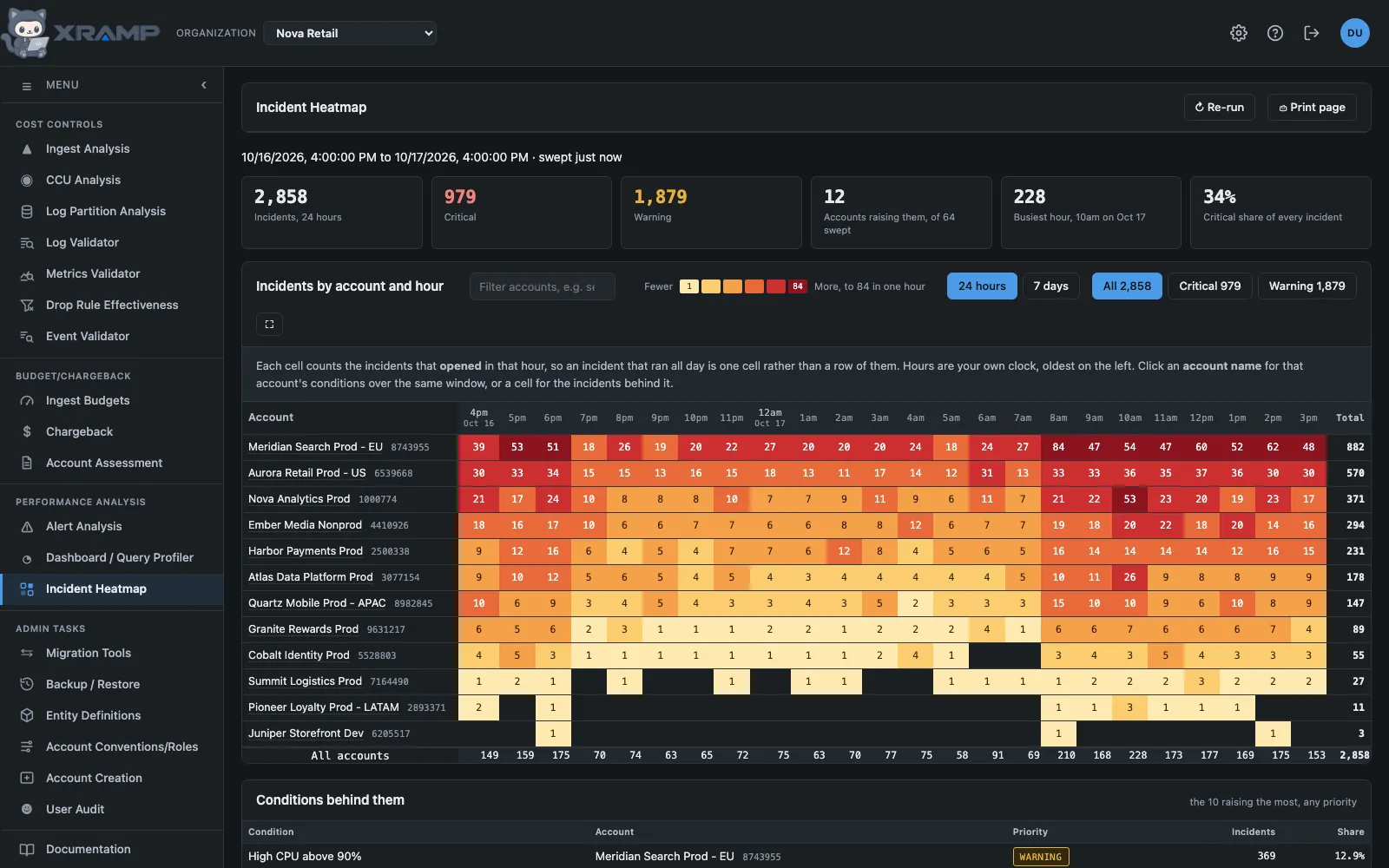
A day of alerting across every account at once: which accounts raised incidents, in which hour, and what condition was behind them. Any one account can then be opened by condition, on the same hours.
The window
24 hours draws a column per hour. 7 days draws one per three hours, because a week of hourly columns is 168 of them, about five screens of dragging to read one row; at three hours a nightly batch still reads as a band. Columns start at midnight on your own clock either way, and the day is marked where it turns over. Each window is its own sweep with its own stored result, so going back to one already read is immediate, and an account left open is redrawn on the window you switch to.
What a cell counts
One row is an account, one column an hour on your own clock, oldest on the left, and the cell is the incidents that opened in that hour, or in those three on the week. Opened rather than open, so an incident that ran for nine hours is one cell rather than a row of nine. Colour is on a log scale: one account can raise more incidents in an hour than the rest of the estate raises all day, and a straight scale would leave every other account white.
Every account in the estate is listed: the ones that raised incidents first, busiest at the top, then the accounts that raised nothing, by name, as rows with empty cells and a total of 0. The summary still says how many raised incidents out of how many were swept. New Relic's own system account is listed too, greyed and labeled as it is everywhere else. The quiet accounts stay listed when you switch to Critical or Warning, since an account with none of that kind is an answer too. The box at the top of the table filters the rows the same way the other search boxes do: it matches a name or an id, and several terms separated by commas show rows matching any of them. The condition map has its own, filtering conditions, and neither changes the colors, which stay keyed to the whole map so a filtered view can still be read against the legend. All, Critical and Warning switch which incidents the map, the totals and the color are counting.
One account by condition
Click an account name and the map is redrawn for that account alone, one row per alert condition, over the same hours. Alert Analysis carries an Incident Heatmap button beside its title that opens the same thing for the account being audited, so what could fire and what did sit one click apart. It answers the next question the account map raises: the account is loud, but is that one condition or fifty.
The fifty conditions raising the most get a row, and the tile says how many raised anything at all; the totals count the rows on screen. All accounts goes back. A cell here opens the incidents that one condition raised in that hour.
The condition's name opens the condition itself in New Relic, in a new tab. Rows are one per condition rather than one per name, because an account can run several conditions under the same name in different policies: this estate has two called "Memory on OPS Alert" raising 34,435 and 1,636 incidents a day. Where that happens each row shows the condition id beside its name.
Opening an hour
Click any cell that carries a number and it opens the breakdown of that account in that hour: the totals, every condition that raised something with its share of the hour, and the incidents themselves newest first, each with a link into New Relic.
A cell on the condition map opens the same thing for that one condition, and adds the entities it fired on. Entities are shown only there, because an hour of a whole account spreads across thousands of them: one measured hour held 7,068 incidents over 3,128 entities, where the twenty largest covered three per cent and read as a list of ties. Even for one condition the heading says what the chips cover, since New Relic leaves an incident with no entity out of the list entirely. A cell answers to the keyboard as a button as well.
The list holds the newest hundred and the conditions the fifty largest, which the headings say when either is reached. Nothing here is swept in advance: it is read when the cell is opened, because a day of cells nobody clicks would be over a thousand queries.
Where the figures come from
Every account the API key can see is asked for its own incidents. New Relic refuses a
cross-account query naming more than 30 accounts, and more than five once it is faceted,
and NrAiIncident carries no attribute saying which account raised it, so a
single estate-wide query could neither run nor be split apart afterwards. Each account's
query is a plain count over one event type, so a sweep of roughly 200 accounts finishes in
seconds and costs almost nothing.
An account that cannot be read is listed at the bottom with the reason, rather than being counted as quiet.
Freshness
A sweep is kept for ten minutes and reused, because incidents are live data and the whole estate is re-read each time. The line above the summary says when the one on screen was taken; Re-run sweeps again now.
Conditions behind them
Under the map, the conditions raising the most incidents in the window, with the account each belongs to and its share of every incident counted. It is the fastest way to see that one noisy condition accounts for most of a day's alerting.
Related modules
Every X-RAMP plan includes every module. See the plans.