
Entity Definitions for New Relic
Define a custom New Relic entity type, test it against your telemetry, and follow it through New Relic's review.
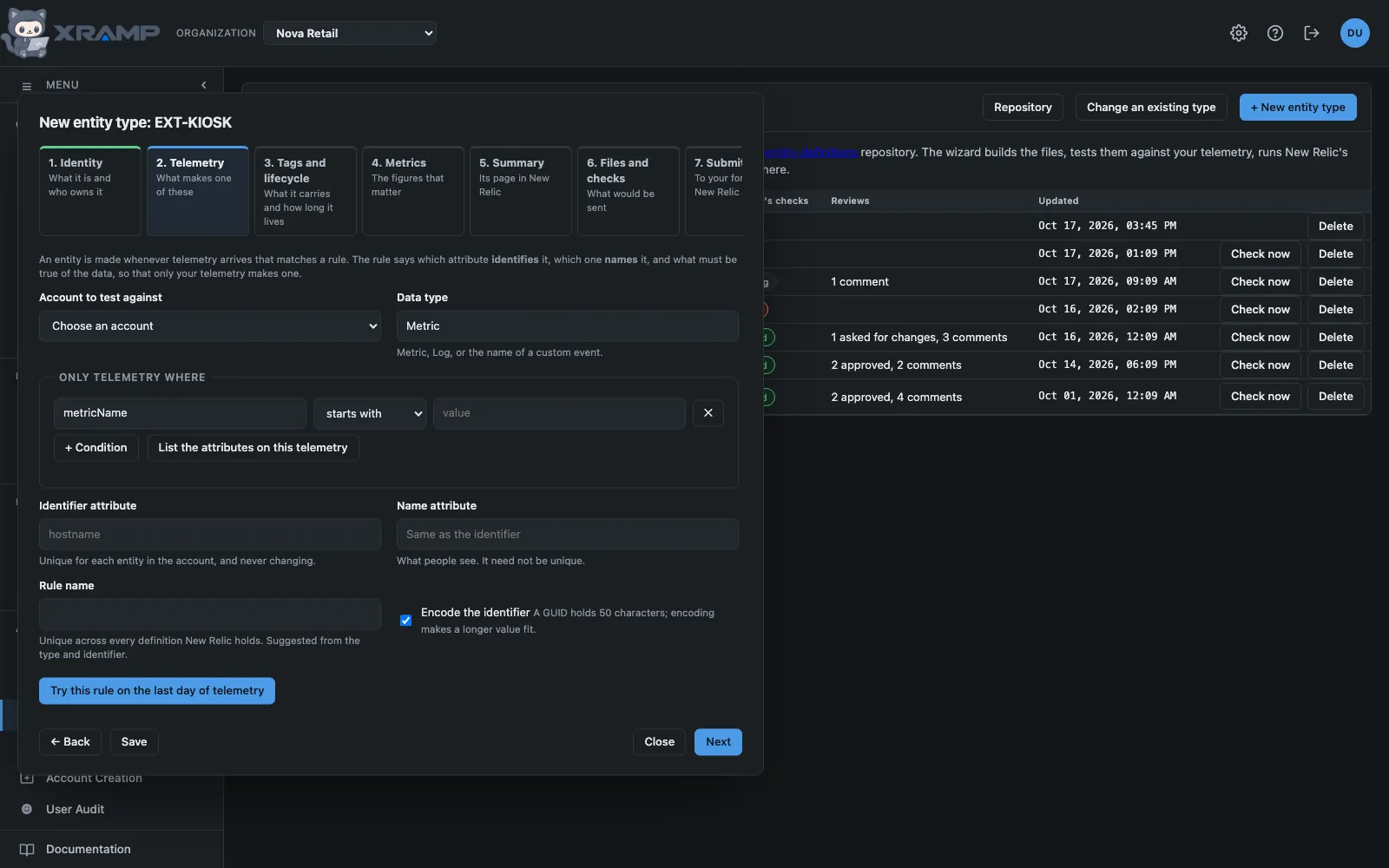
What it shows and how to read it
A custom entity type is how New Relic comes to know about something of yours as a thing in its own right: a device, a job, a service it has no agent for. It is defined by a small set of files that New Relic accepts by pull request on its public repository, newrelic/entity-definitions, and reviews before merging.
This module does everything up to that pull request, and follows it afterwards. It builds the files from your answers, tests them against your telemetry, runs New Relic's own checks before New Relic does, and puts the result on a branch of your fork. You open the pull request yourself, from a link it gives you.
Nothing here changes New Relic. Every test reads telemetry. The one step that writes anywhere writes to your own fork on GitHub.
The repository
An admin sets this up once, under Repository: your organization's fork of newrelic/entity-definitions, and a personal access token that can write to it. Fork New Relic's repository on GitHub first. The token needs Contents: Read and write on the fork. If the token box is left blank, the one Backup / Restore has is used, which works only if that token can also write to this fork. Save and check confirms the repository is a fork of New Relic's and that the token can write to it.
A new entity type
New entity type opens a wizard of seven steps. It can be saved at any step and picked up later.
- Identity. The domain and the type. New Relic recommends the domain EXT. The type says what one of these is, in capitals, and is checked against every type New Relic already has. Then the owners: New Relic asks the primary owner to review future changes, and contributors outside New Relic use NewRelic Community.
- Telemetry. The rule that makes an entity. Choose an account to test against and the data type, then say what must be true of the data, which attribute identifies the entity, and which names it. List the attributes reads the attributes actually on that telemetry so they can be picked. Try this rule runs it over the last day and shows the entities it would create, how long the longest identifier is, and how much the conditions narrow it.
- Tags and lifecycle. Which attributes are copied onto the entity as tags, whether alerts can be set on it, and how long it stays findable after its telemetry stops.
- Metrics. Up to ten golden metrics, the figures that say how one of these is doing, each with a unit. Test runs one for each entity the rule would make, the way New Relic will. Tick In the list for those to show as columns in the explorer.
- Summary. Optionally, a dashboard of yours to serve as the entity's page. Its account number is taken out of every query, since in a definition they run for whichever account the entity is in. A dashboard that uses variables cannot be used.
- Files and checks. The files that would be sent, which can be edited by hand. An edit is kept, and stops the earlier steps rewriting the files; Rebuild from my answers throws the edits away.
- Submit. Described below.
A rule with no conditions is refused. Without one, any telemetry that happens to carry the identifying attribute would become one of your entities, whoever sent it.
Changing an existing type
Change an existing type lists every type New Relic holds. Choosing one loads its files as New Relic has them now, to edit directly: add a rule for a new source of data, a golden metric, a tag. What I have changed shows your edits against New Relic's copy, line by line. The change is checked and submitted the same way as a new type.
The checks
Check runs New Relic's own validation, not an approximation of it: their schemas, read from their repository, and their rules, applied against every definition they hold. Problems New Relic's pull request check would reject are listed in red against the file they are in. Things that would pass and are worth a look first are listed in yellow.
The rules most often met: every rule needs a name unique across all of New Relic's definitions; an identifying attribute another type already uses needs conditions that tell yours apart from it; units and expiration times come from fixed lists. New Relic's repository is read once and kept for six hours.
Submitting
The last step is a path of five stages, ticked off as they happen.
- Save it.
- Put the files on your fork. For admins. The files are checked once more and refused if they would fail, then written to a new branch of your fork, which is first brought up to date with New Relic's. Nothing has reached New Relic yet.
- Open the pull request. The button opens GitHub with the title and description filled in. You press Create there, in your own name: the contribution is yours, and New Relic's contributor agreement, which GitHub prompts for on the pull request, is yours to sign. New Relic asks outside contributors to contact New Relic Support about its review board.
- New Relic reviews it. Their automatic checks run and their team reviews. The stage shows each check's result, approvals, requests for changes and comments.
- Entities appear. New Relic deploys a definition some time after merging it. Once it is merged, this module looks for entities of the type in your organization, and marks it Live when the first one exists.
Before submitting, the step reminds you that this is public. New Relic's repository is public and so is your fork: the files name your attributes and metrics, and the summary dashboard carries its queries.
Following it
The list shows every definition with its status: Draft, On your fork, In review, Checks failing, Changes requested, Approved, Merged, Live, or Closed. Each one in flight is checked every ten minutes, and Check now asks GitHub at once. If a reviewer asks for changes, open the definition, edit the files, check them, and use Put the latest files on the branch: the pull request picks the change up by itself. Deleting a definition from the list removes nothing on GitHub; a branch or pull request it has stays where it is.
Who can do what
Anyone granted this module can prepare, test and check a definition, and follow one. Setting up the fork and putting files on it are for admins.
Related modules
Every X-RAMP plan includes every module. See the plans.