
Log Partition Analysis for New Relic
Find the log partitions that would make queries cheaper, and review what implementing them would change before you do.
What it shows and how to read it
Which slices of a log partition would pay for a partition of their own, measured in the CCU a day they would save.
Why a partition, and not a WHERE clause
A query is charged for what it inspects, not what it matches, and what it inspects is the
whole partition. Measured in Aurora Retail Prod over the same ten minutes, FROM
Log inspected 76.9 million records for 0.0592 CCU, and FROM Log WHERE appName
= 'gateway' inspected 76.3 million for 0.0591 while matching a tenth of them. Moving
a slice into its own partition is therefore the only way to make the queries that do not
want it cheaper, and they get faster in the same proportion.
What it measures
Pick an account and a partition and press Analyze. It reads the last 24 hours of queries New Relic recorded against that partition, works out what each one filters on, and takes a single ten minute sample of the partition to measure how much data each of those filters describes. It spends a fraction of a CCU and takes a few seconds; the result is kept for a day, and Re-run measures again.
Candidates are whole plans: split the partition along one attribute, a partition for each of its values, which is what people mean by partitioning logs. A partition each for orders, offers and payments, say, or one per market or per cluster.
Queries rarely name an attribute like capability, they name an application, so each value's applications are read from the data and a query naming one is routed to that value's partition. An application counts only when nearly all of its records carry the same value, since every application logs at every level and mapping on the last value seen would flatter a split by level enormously.
A value earns a partition by being large or by being heavily queried, so a small slice
everyone asks for is not passed over: Aurora Retail Prod's menu capability is
about 1% of the bytes and carries 38,000 CCU a day of queries. Values that differ only in
capitals are treated as one, since a rule can name both spellings: Aurora Retail Prod logs
its orders capability as both orders and Orders. Values that are neither stay in what
remains, and the screen says how many.
Each candidate is ranked by the CCU a day it would save: the queries that can be routed to one partition, freed from scanning the others.
The biggest value is not where the saving comes from. market = 'us' is
two thirds of that partition, so a query routed to it still reads two thirds of the data.
The saving is in everything routed away from it.
Building a plan
Tick the splits you would write and press Measure this plan. Each rule is measured against what the rules above it have already taken, and every query is routed to the first partition that holds what it asked for.
When every rule tests one attribute for different values, the order makes no
difference, because no record can match two of them; the screen says so and does not
offer to reorder. Order matters when rules can overlap, such as one on appName
beside one on capability: measured on Aurora Retail Prod, that pair scores 26%
one way and 29% the other, because whichever rule applies first takes the shared records.
A measured plan also carries the rule New Relic itself needs for each partition: the matching clause, which is the rule's own NRQL with no FROM and no WHERE, and the NerdGraph mutation that creates it, with the account, the target partition name and a STANDARD retention policy already filled in. Field names come from the account's own schema rather than from documentation. X-RAMP creates nothing: run the mutation with a key that may write log configuration, or type the clause into Manage data, Data partitions.
Queries that name nothing a rule could match read every partition whatever you do, and they are listed with what they cost. Narrowing the worst of them is often worth more than another partition.
Before and after
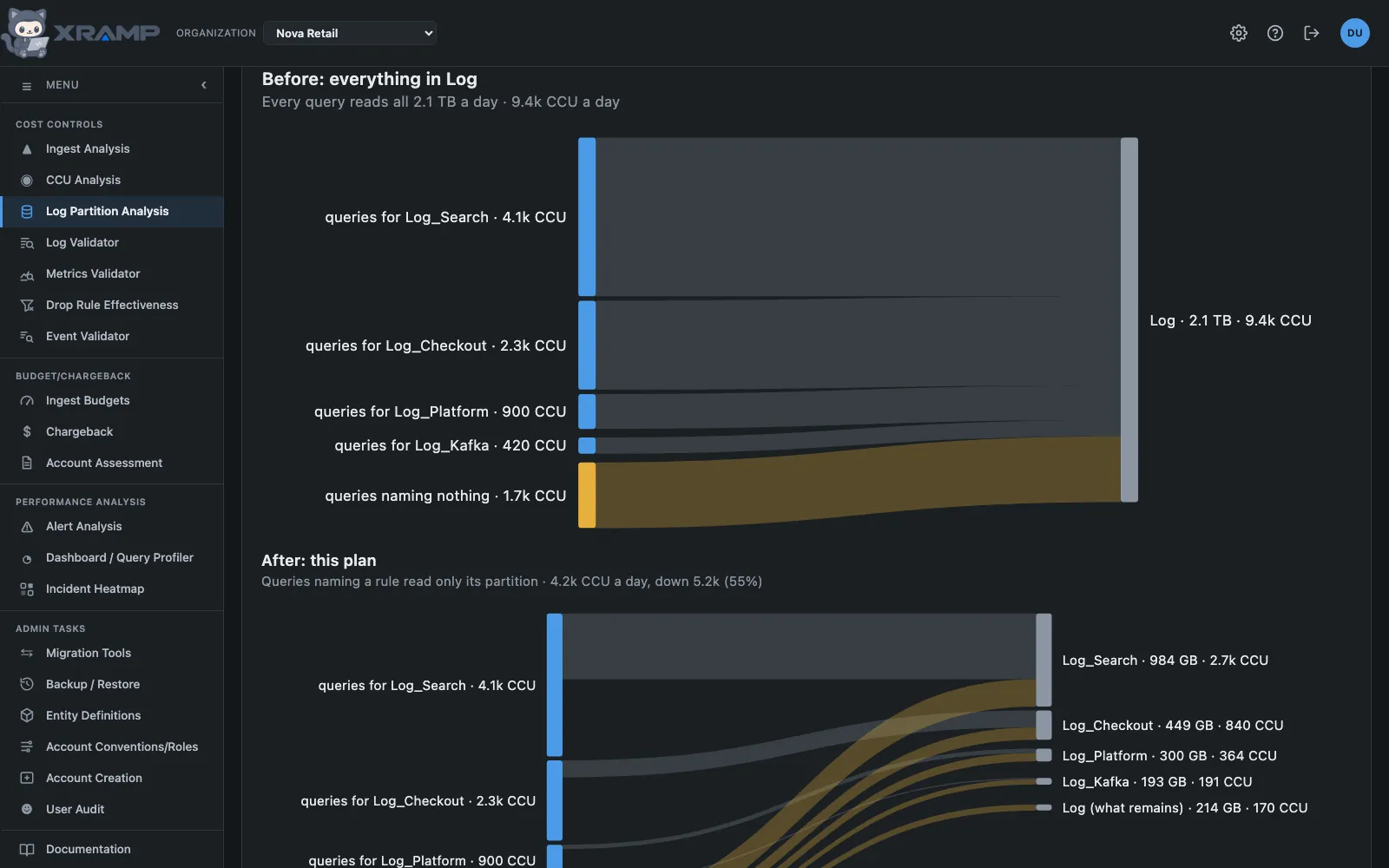
A measured plan is drawn as two Sankey diagrams above the table, to the same scale, so the second is visibly shorter by what the plan saves. The width of every band is the CCU a day it costs.
- Before: each rule's queries, and the queries that name nothing a rule keeps (amber), all flow into the single partition, because every query scans all of it today.
- After: a query that names a rule's attribute reads only that rule's partition, so its band is narrower and ends in a much smaller bar. Queries that name nothing still read every partition, so they fan out to all of them in proportion to each partition's size. They are usually most of what remains.
Each partition shows its size and the CCU it still receives, and the heading gives the total, the saving in CCU and the percentage. The diagram is built from the plan as measured, so it moves with the rules you choose and costs nothing more to draw.
What the change would break
Affected config entities, beside Measure this plan, lists every dashboard widget and alert condition reading this partition today and names the partition each would have to query instead.
Creating a partition rewrites nothing. A condition still reading the old partition keeps running and quietly stops seeing whatever moved, which is the real risk in this kind of change, so the list is worth reading before the rules go live.
Alert conditions are every condition in the account, read from the alerts API at no CCU cost. Dashboards are those New Relic recorded running in the last 24 hours, so a dashboard nobody opened is not listed. A query marked every partition filters on nothing a rule matches, so it cannot pick one and has to name them all.
Printing
Print partitions prints the plan: what each partition would hold, what it saves, and the rule to create it. Print everything adds the dashboards and conditions to rewrite, and the affected report has its own buttons for either list or both. Each is built as its own document rather than a screenshot of the screen, so the tables fit the page and nothing is cut off.
Before you act on it
Nothing here changes New Relic. Partition rules are created in New Relic's own console, they apply at ingest, so a plan changes tomorrow's queries and leaves yesterday's data where it is, and every query that wants the moved data has to name the new partition. That last point is the risk worth planning for: an alert condition still reading the old partition keeps working and quietly stops seeing what moved.
Related modules
Every X-RAMP plan includes every module. See the plans.