
Metrics Validator for New Relic
Identify the metrics you ingest that nothing reads.
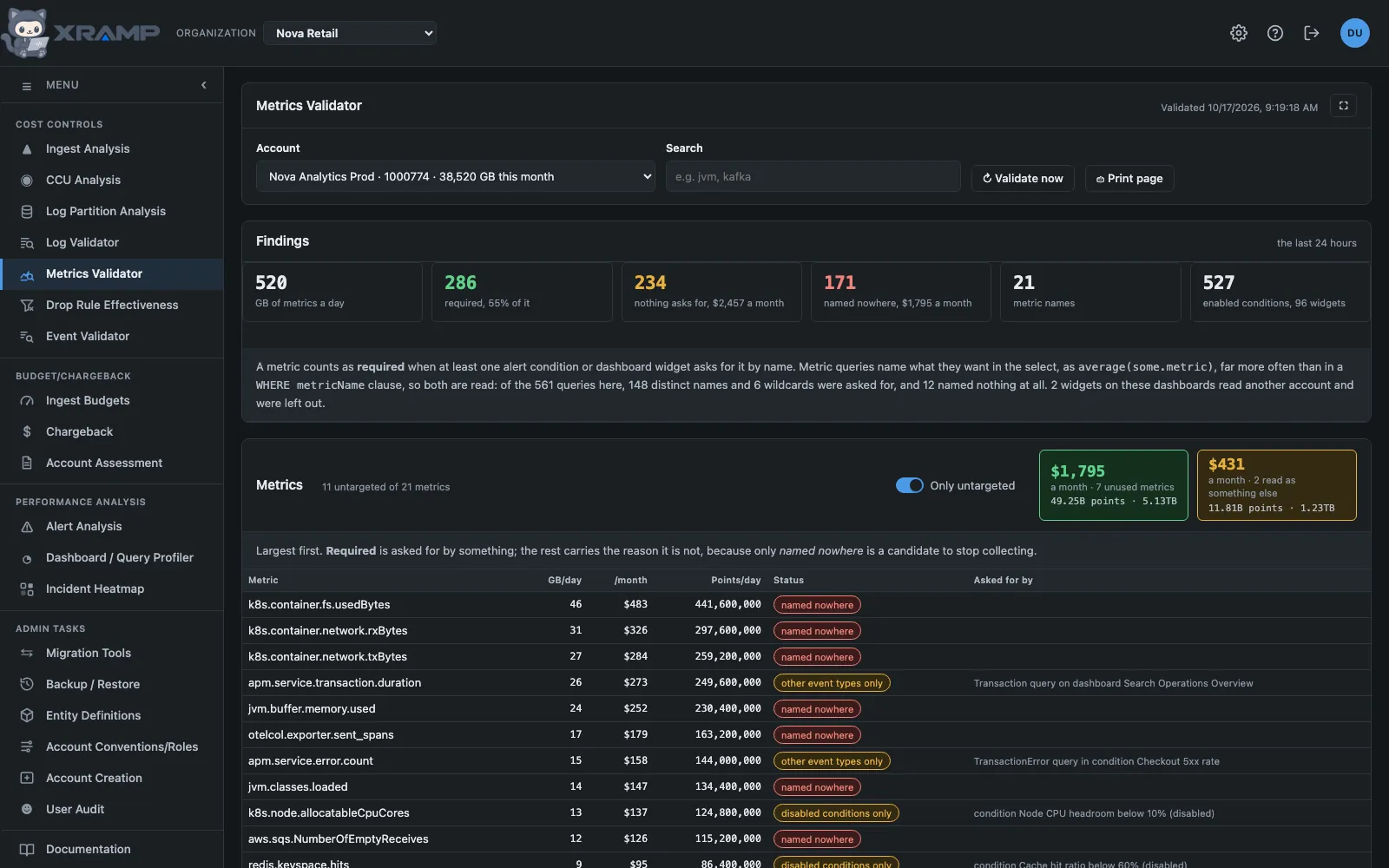
What it shows and how to read it
The Log Validator's question, asked of Metric: which of an account's metrics
an alert condition or a dashboard widget actually asks for, and what the rest costs a
month.
The screen is deliberately the same shape, because it is the same decision. What is underneath differs in two ways that matter.
How a metric query names what it wants
A log query names its stream in a WHERE clause. A metric query usually names
its metric in the select itself: SELECT
max(kafka_consumer_group_ConsumerLagMetrics_Value). Of the 20,071 metric queries in
Aurora Retail Prod, only 827 carry a metricName predicate at all, so reading
the WHERE clause alone would have reported almost every metric as unused.
Both are read, along with metricName wildcards, and the select is read through
nesting: rate(sum(newrelic.timeslice.value), 1 minute) asks for the timeslice
metric, not for sum.
Function arguments are collected loosely and matched strictly.
uniqueCount(host.name) hands back an attribute rather than a metric, which
costs nothing, because a candidate only counts once it matches a metric the account
actually ingests. Being generous at the reading and strict at the match is what stops a
spelling nobody anticipated from turning a watched metric into a drop candidate.
No partitions, and one key
metricName is on every record, so there is no key to choose, and metrics have
no data partitions, so there is no wrong partition to be stranded in. FROM
Metric is the whole of it.
That is why the third section here is about something else: metrics whose only reader is an alert condition that is switched off.
What the totals are
Totals are the sum of the metrics in the table rather than a separate measurement of the
day. The two do not agree: bytecountestimate() sizes a faceted set differently
from an unfaceted one, and on Aurora Retail Prod the day reads 10,005 GB whole against
8,667 GB summed across its 1,792 metrics. The point counts reconcile to within 35 of 2.9
trillion, so nothing is missing from the table; the screen says so where the difference is
more than a couple of percent. Using the larger figure as the denominator would quietly
understate how much of the account is required.
Who else reads a metric
A dashboard or an alert condition is not the only thing that reads a metric. People query
by hand, New Relic's own screens read metrics by name, and scripts ask through the API.
None of that is written down anywhere except New Relic's query log, so the validator reads
it: every query against Metric in the account for the last 30 days, with who
ran it and from where.
A metric counts as queried by name when its name appears in a query, and by
wildcard when only a metricName LIKE pattern matched it. The two are kept
apart, because a wildcard that sweeps a metric up is weaker evidence that anybody needs it.
Queries made with this application's own API key are left out: that is the application
auditing, not a person asking.
Every metric shows People and Runs from the log, and where the query came from: the query builder, a named New Relic screen, a dashboard, the API or New Relic AI. A dashboard run is recorded against whoever had the dashboard open, so one person with a great many runs is often a screen left on a wall.
If the query log cannot be read the screen says so, rates nothing as low risk, and falls back to what dashboards and alert conditions ask for.
Overlapping metric sets
The same thing is often collected twice. Three kinds are found:
- Two naming conventions. Prometheus exporters name with underscores and OpenTelemetry receivers with dots, so a cluster watched by both reports every pod, container, host and process twice:
kube_*besidek8s.*,container_*besidecontainer.*,node_*besidesystem.*,process_*besideprocess.*. - Two routes. One metric name arriving both over OTLP and through Prometheus remote write, as a collector reporting its own health often does.
- Two near-identical names. Names that differ only by a
_totalsuffix, or by dots for underscores.
Each set is shown with its sides next to each other: how many metrics and how many GB a day each side is, how much of it is named by a query, dashboard or alert, how much was wildcard only, how much was never queried, and the people who read it. That is what says which side can go: the one nobody reads.
Risk of dropping
Every metric is rated from what asks for it, who queried it, and whether it is sent twice.
- In use. A dashboard or a live alert condition in the account asks for it, or ten or more people queried it. Not offered for dropping.
- Medium risk. No dashboard or alert asks for it, but fewer than ten people queried it. Those people are named, with how often and from where, so they can be asked first.
- Low risk. Nothing in the account asks for it and nobody queried it in the 30 days. Low risk, overlapping is the same and also belongs to a set that is sent twice, so the same facts go on arriving another way.
- Made by New Relic. Metrics New Relic generates itself, such as
newrelic.goldenmetrics.*. They are not sent by the account, so no drop rule is offered.
The sections
Drop rules - Low risk: unused and overlapping and Drop rules - Low risk: unused, no overlap are NRQL ready to paste into New Relic as Drop data rules, for the two low risk groups. These are the ones to act on first.
Medium risk - Queried by fewer than 10 people lists each such metric with everyone who queried it. No drop rule is offered: the task it creates is to ask them.
Remediation - Disabled conditions only is the metric side of the log screen's wrong partition, and the same kind of finding: a query exists and cannot serve anybody. These metrics are collected for an alert that is switched off. Turn the condition back on or delete it; no drop rule is offered, because dropping the metric settles that question by accident.
Each section carries a Create task button holding all of its recommendations.
Running it
Validate now is an admin's button and asks first, the same as the Log Validator and for the same reason.
The nightly job is its own, configured under Admin, Metrics validator config, with its accounts in the Metrics analysis column of the table under Cache scheduler. Left empty it takes the busiest 15 accounts by ingest. It runs at 6am, an hour after the log validator.
An account ticked in both that column and Log analysis has its conditions and dashboards read twice a night, once by each job. That is the cost of choosing the accounts for each separately, and it is a real cost on a large account: tick an account in one column only if the other answer is worth the read.
Related modules
Every X-RAMP plan includes every module. See the plans.